


Guidelines for applicants
Please read this information before applying:
- Please check our exclusions and make sure that your work is in our area. If your project is outside the areas shown on the map please do not apply.
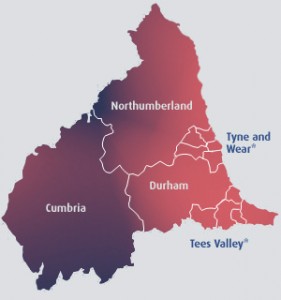
*Tyne and Wear: Gateshead; Newcastle upon Tyne; North Tyneside; South Tyneside; Sunderland.
**Tees Valley: Darlington; Hartlepool; Middlesbrough; Redcar and Cleveland; Stockton-on-Tees. - Read the descriptions of the programmes to see whether you fit within our current priorities, and to check for any additional guidance that describes in more detail the kinds of proposals we wish to support.
- If you are applying for the salary of a new or existing post, read our additional guidance on employing people.
- You can check the Our Grants page for the most up-to-date information about our work, and to see a list of recent grants.
- If your proposal involves research that will be done by a university, please first read our additional guidance on research funding for universities.
If you are eligible, please apply online. Applying online is the easiest and quickest way to apply to the Foundation. Please contact the office for further information. It is possible, by special arrangement, for groups to apply on tape or video. If there is anything else we can do to help groups to apply please tell us.
To apply online you must have a valid email address. If you do not have a valid email address please contact us.
Making an online application:
- You need to choose whether you are applying for a grant under £20,000, over £20,000 or the Fresh Ideas Fund and select the correct online application.
- You will be asked to complete an eligibility checklist. If you answer the questions successfully you will go straight to the online application form. If not, you will receive a message saying your application is ineligible.
- Once you enter the application form you will be asked to create a new user account with us. You should create your user account before starting to fill in your application. Please enter your email address carefully so that you receive confirmation messages successfully.
- Once you have set up your user account you can save your progress, come back at a later date and view any applications you make online by clicking Save and Finish Later
- At the end of the online application, you can upload any supporting information you have in electronic formats e.g. Word, Excel and PDF files. Before you submit your application, please check that you have assembled all the information we require.
- Once you submit your online application, you should print off the Sign Off and Submission sheet, get it signed by your Chairperson or Treasurer and send it to us with any documents you can not upload. We will not start processing your application until we receive all the documents either online or by post.
Depending on your grant application we will require some or all of the documents listed below:
- The budget for your proposal
- Your most recent annual report
- Your most recent audited or independently examined accounts
- A copy of your governing document
- Job descriptions and person specifications for any staff salaries included in your proposal
- For charities awaiting registration, copies of relevant correspondence with the Charity Commission
- For applications over £20,000, your two-page supporting statement. (This is not required for a Fresh Ideas application)
If you have any questions about the process please contact us.
The Foundation operates independently of Northern Rock plc. Please do not ask employees or Board members of Northern Rock plc, or the Trustees of the Foundation individually, to support your application.

